MiniMax H3 can make a clip from words alone, from a starting picture, from two pictures, or from reference files. Its documentation gives each of these jobs a short name: T2VA, I2VA, FL2VA, L2VA and Ref2VA.
This guide explains each mode in plain words, shows where each one lives in ComfyUI, and ends with a table for choosing. If you have never opened H3, start with MiniMax H3 in ComfyUI: what every part does.
A few words first
- Mode: one kind of job H3 can do. What you give the model decides the mode.
- Frame: one still picture in a clip. H3 makes 24 frames a second, so a 5-second clip has about 120.
- First frame, last frame: the clip's opening and closing pictures.
- Reference: a picture, video or sound the model borrows from without starting or ending on it.
- Model file: the large file of learned numbers that makes the clip. H3 has two.
- Template: a ready-made workflow that ships with ComfyUI.
The names, decoded
Every mode name is what you give the model, then "2", then VA: video and audio, because H3 always makes both.
| Name | Short for | What you give it |
|---|---|---|
| T2VA | text to audio-video | words only |
| I2VA | image to audio-video | words and a first frame |
| FL2VA | first and last frame to audio-video | words, a first frame and a last frame |
| L2VA | last frame to audio-video | words and a last frame |
| Ref2VA | reference to audio-video | words and reference pictures, videos or sounds |
Five modes, two files
The five modes run on only two model files. This chart shows what each takes in and where its pictures land on the clip.
MiniMax's model card lists two released files: FL2VA and Ref2VA. The card names the FL2VA file's tasks as text-to-video and first/last-frame-to-video. With no picture it makes a clip from the words; with pictures it pins them to the start, the end or both. So the first four modes are one file used four ways, and only Ref2VA needs the second.
| Mode | Model file in ComfyUI | ComfyUI template | Pictures |
|---|---|---|---|
| T2VA | minimax_h3_fl2va_… | Text to Video | none |
| I2VA | minimax_h3_fl2va_… | Image to Video | one, as frame 1 |
| FL2VA | minimax_h3_fl2va_… | Image to Video, both inputs connected | two: first and last |
| L2VA | minimax_h3_fl2va_… | Image to Video, last input only | one, as the final frame |
| Ref2VA | minimax_h3_ref2va_… | Reference to Video | up to 9 pictures, 3 videos and 3 sounds |
Each file comes in several sizes. H3 model file names decoded explains which to download.
Find the modes in ComfyUI
ComfyUI's template browser has a template for each kind of job. Click Templates in the left-hand bar, open Model Filter and tick MiniMax H3, then open Runs on and tick ComfyUI. The second filter hides versions that run on MiniMax's paid online service, which are marked "API".
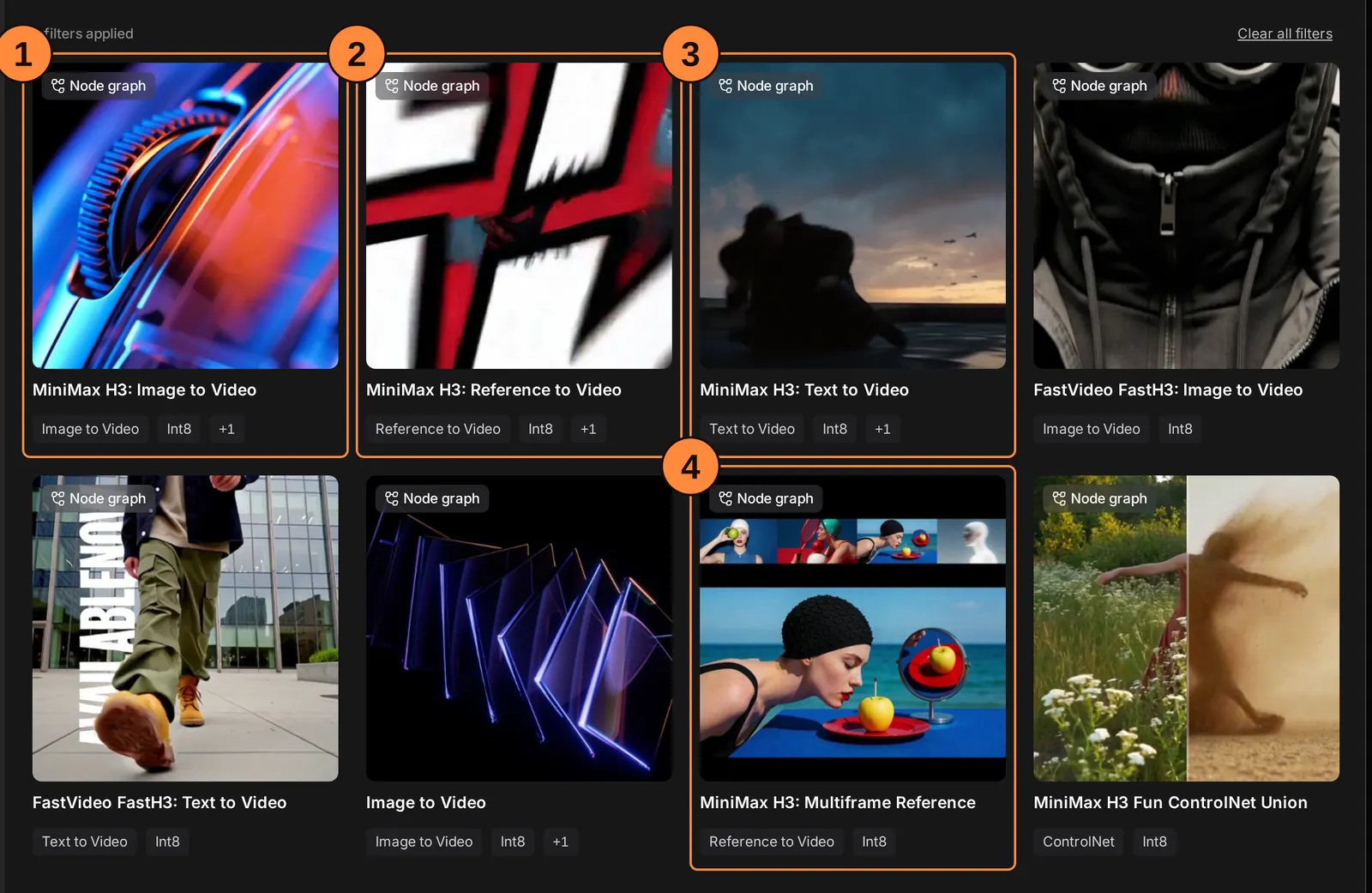
- MiniMax H3: Image to Video covers I2VA, FL2VA and L2VA. It loads the FL2VA file.
- MiniMax H3: Reference to Video is Ref2VA. It loads the Ref2VA file.
- MiniMax H3: Text to Video is T2VA. It uses the same main box as Image to Video, with no picture connected.
- MiniMax H3: Multiframe Reference pins pictures at chosen moments inside the clip, not only at its ends. It needs ComfyUI 0.34 or newer.
The other cards are faster builds and add-ons; this guide keeps to the four numbered ones.
The two picture inputs
One box covers four modes, and its two picture inputs decide which. This is the main box of the Text to Video template, where both are left empty.
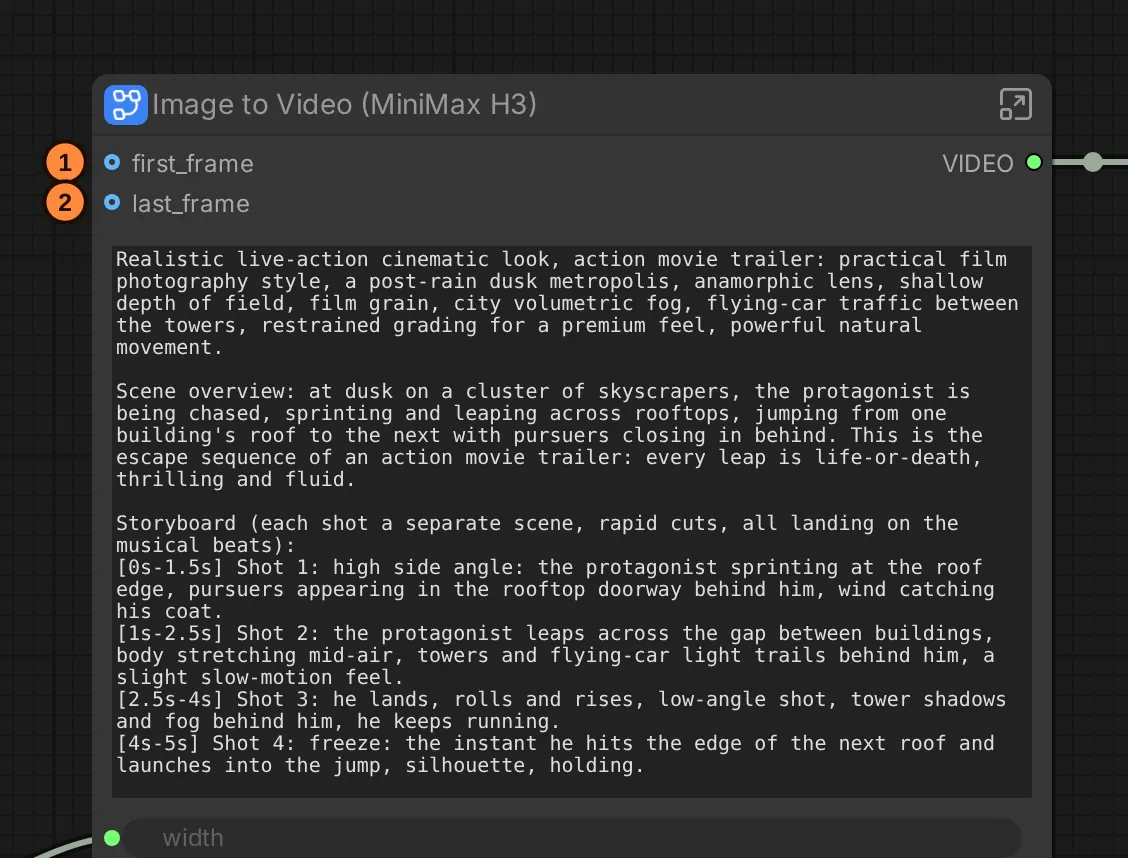
- first_frame: wire a Load Image node in here and the clip starts on that picture. That is I2VA.
- last_frame: wire a picture in here and the clip ends on it. That is L2VA. Wire pictures into both inputs for FL2VA.
ComfyUI's documentation says either input or both may be connected. It ships no last-frame-only template, so for L2VA connect only last_frame and check the result.
T2VA: words only
T2VA makes the whole clip from your prompt: the look, the people, the place and the sound.
Use it when you have no picture and want to try an idea. Everything the model invents, it invents again for each new seed (the number that sets the clip's starting noise): faces, clothes, the room. That is fine for one clip. It is a problem for a series of shots in which the same person must look the same each time.
I2VA: a first frame
I2VA starts the clip exactly on your picture and moves forward from it.
Use it whenever you have the opening picture. The picture fixes the person, the clothes and the room, and I2VA adds motion and sound. Clips that start from pictures of the same scene stay consistent with each other.
Two things matter more here than in any other mode:
- The picture's size and shape. H3 makes clips 768 pixels on the short side. A start picture in the clip's own shape (9:16 for upright video, 16:9 for wide), at that size or larger, keeps the first frame clean.
- The text encoder reads the picture too. The encoder is the part that turns your words into numbers for the video model, and H3's also looks at pictures. A dark or cluttered picture weakens the whole clip, not only frame 1.
The detail: MiniMax's prompt guide describes the clip in phases: the first frame, the start of the action, its development, and the result. The prompt opens with a line saying the picture is fully used at 0.00 seconds.
FL2VA: first and last frame
FL2VA starts on one picture and arrives at another.
Use it when you know where a shot must end: a person who ends up seated, a door that ends up open, a camera that arrives at a new framing. The model fills in a continuous path between the two.
Give it two pictures that can be joined in the time you allow: the same place, the same light, and an amount of change a camera could see happen. The further apart they are, the harder it is for any path between them to look natural.
The detail: MiniMax's guide describes the phases as the first state, visible changes, the gap narrowing, and the last state. The prompt opens by placing picture 1 at 0.00 seconds and picture 2 at the clip's last second.
L2VA: a last frame
L2VA ends the clip on your picture and invents how it got there.
Use it when the picture you have is the moment to land on: a reveal, a final pose, a product in its place. The phases run the other way from I2VA: an earlier state, the action, a gradual approach, and the landing on the last frame.
The detail: in MiniMax's guide the picture belongs to the last shot, and the opening line places it at the clip's last second.
Ref2VA: references
Ref2VA makes a new clip that borrows a character, a style, a motion, a camera move or a voice from reference files, without starting on any of them.
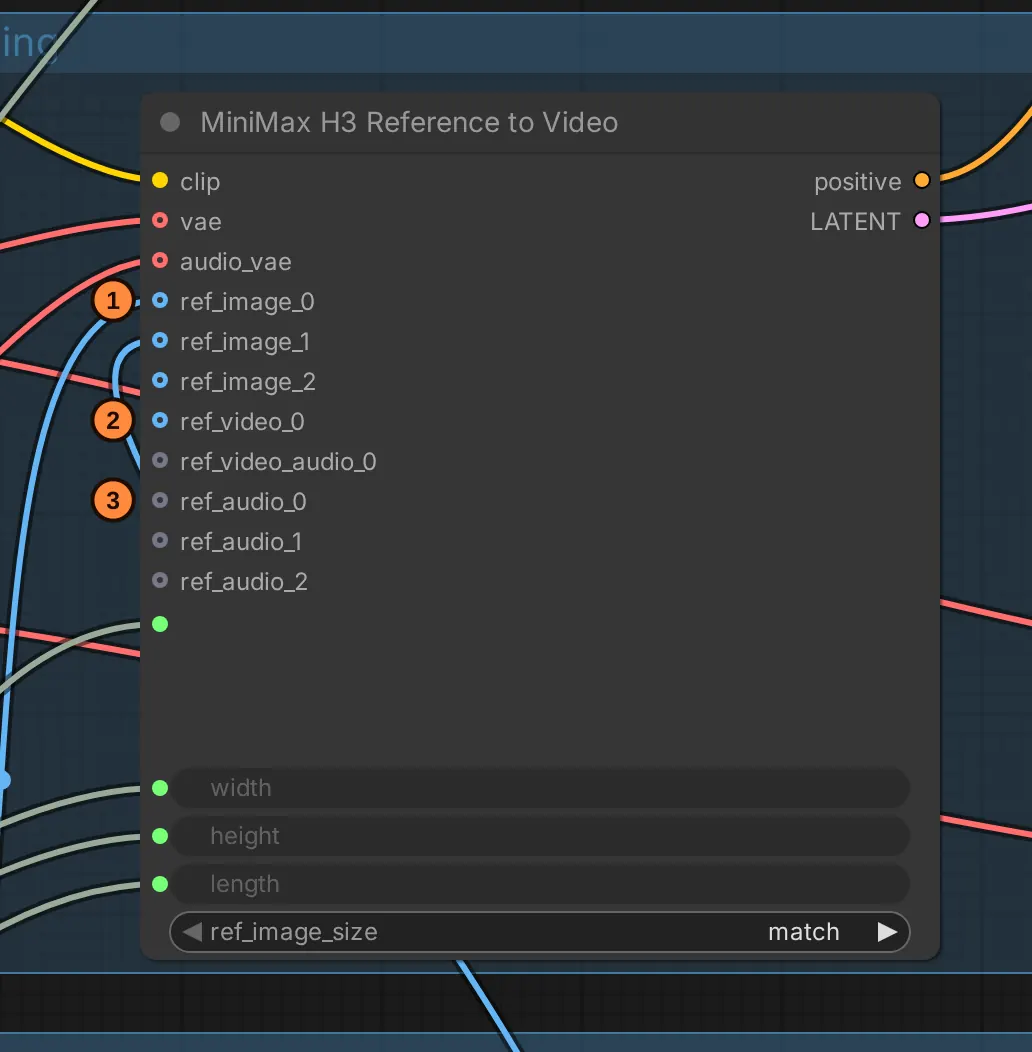
- ref_image inputs take pictures: a face, a costume, a product.
- ref_video takes a video clip, for a motion or a camera move. Its sound has its own input just below it.
- ref_audio inputs take sound files, such as a voice.
ComfyUI's documentation gives the limits as up to 9 pictures, 3 videos and 3 sounds; MiniMax's card caps the total at 12 files. In the prompt you name each input by a tag, in the order you connected them: <Picture 1>, <Video 1>, <Audio 1>.
Before you rely on it:
- It is a different model file. Switching between Ref2VA and the other modes means loading another file of 21 GB or more. Keep similar jobs together.
- References are not pixels. A reference tells the model what something looks like; it does not force those pixels into the frame. If a shot must start on an exact picture, use I2VA.
- Speed-ups weaken references. ComfyUI's speed-up file for Ref2VA runs at 4 steps, and its own page warns that a reference can then end up barely applied.
Which mode should you use?
| You have | You want | Use |
|---|---|---|
| Only an idea | A quick look at it | T2VA |
| A still picture | It to move and speak | I2VA |
| A start and an end picture | The path between them | FL2VA |
| The final moment | What led up to it | L2VA |
| A character sheet, a sample clip or a voice | Something new that keeps them | Ref2VA |
| Several fixed moments inside one clip | All of them held | Multiframe Reference |
The prompt's fixed shape, whatever the mode
MiniMax trained H3 on prompts with a fixed structure, and its open prompt-writing guide describes it. In short:
- For I2VA, FL2VA and L2VA, the first line says how the pictures line up with the clip, then one blank line.
- Three named fields follow:
integrated_multimodal_description,overall_soundscapeandnon_diegetic_music. - The description is split into shots.
[Shot 1]opens with the style and the starting picture's contents. Each later shot opens with its cut time, likeAt 00:03.500, the camera cuts to. - Speakers get IDs such as
(S1), and spoken words go inside<d>tags with a language label:<d>[English] First batch of the morning.</d>. - The soundscape is one to four sentences, and the music field says
N/Awhen there is none.
Your first H3 video has a short worked example.
Sources: MiniMax's H3 model card and its base prompt-writing guide in the same repository; ComfyUI's H3 tutorial and native workflow page. Screenshots: ComfyUI's stock template browser and its "MiniMax H3: Text to Video" and "Reference to Video" templates (ComfyUI 0.39.2), labels added.