ComfyUI's MiniMax H3 download page lists a dozen video model files whose names differ only at the end. Most of them are the same model stored in different ways.
This guide takes a file name apart piece by piece, says what each way of storing costs, and ends with the files to download for 16, 24 and 32 GB cards. If you are new to H3, read MiniMax H3 in ComfyUI: what every part does first.
A few words first
- Model file: a large file of learned numbers, called weights. H3 needs four: the video model, the text encoder and two decoders.
- Bit: the smallest unit of computer memory. A number stored in 16 bits is more exact than one stored in 8 or 4, and takes more room.
- Precision: how many bits each weight is stored in, and in what format.
- Floating point: a way of storing numbers with a movable decimal point, such as 0.0031 or 2,400. Integer formats store whole numbers only.
- Quantised: stored in fewer bits than the original, to make the file smaller.
- VRAM: the memory on your graphics card. RAM is your computer's main memory.
- GB: gigabyte. File listings count a thousand million bytes; cards count 1,073,741,824 bytes (a binary gigabyte), so a 24 GB card holds about 25.8 GB of files.
Reading a file name
A file name is five pieces, read left to right. Here is the default video model in ComfyUI's templates.
- minimax_h3 is the model family.
- fl2va says which of the two model files this is:
fl2vafor text and frames, orref2vafor references. H3's modes explained covers the difference. - pruned means a block of weights that can be worked out in advance was left out. The full files do not have this word.
- int8_convrot is the precision: 8-bit integers, with a rotation trick explained below.
- .safetensors is the file format. It holds numbers only, no code, so it is safe to load.
The text encoder's name works the same way: qwen3vl_32b_minimax_h3_nvfp4_awq.safetensors is the Qwen3-VL-32B encoder, cut to the layers H3 uses, stored in 4-bit NVFP4 with AWQ.
Where the names appear in ComfyUI
The template's main box has one row for each model file. The file you choose there must be in the matching folder inside ComfyUI's models folder.
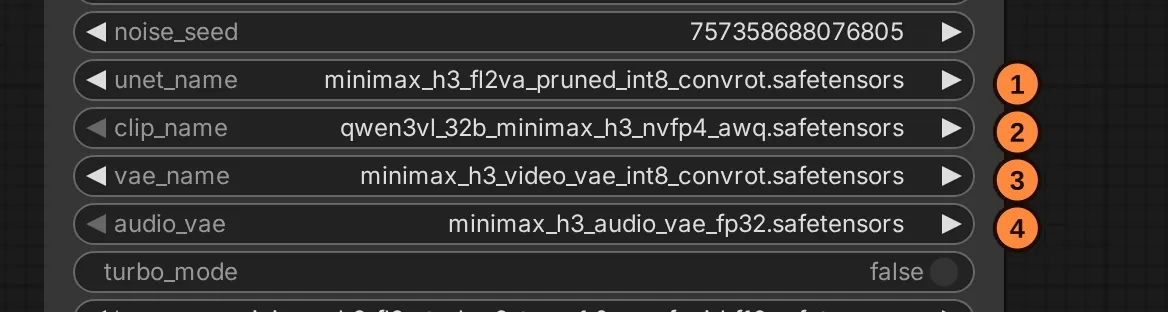
- unet_name is the video model. Its file goes in
diffusion_models. - clip_name is the text encoder. Its file goes in
text_encoders. - vae_name is the video decoder. Its file goes in
vae. - audio_vae is the audio decoder. Its file also goes in
vae.
Click a row to pick a different file: the list shows the files in that folder.
What every precision word means
Fewer bits make a smaller file that needs less memory, at some cost in accuracy. The question is always how much.
| In the name | What it is | Bits per weight | Notes |
|---|---|---|---|
bf16 | bfloat16, a 16-bit floating-point format | 16 | MiniMax's own release precision; every other file is compared with it |
fp16 | half precision, 16-bit floating point | 16 | the video decoder, at the precision MiniMax's own code runs it |
fp32 | single precision | 32 | the audio decoder; small enough not to matter |
int8_convrot | 8-bit integers, after a rotation | 8 | ComfyUI's recommended format for the video model |
fp8_scaled | 8-bit floating point, with scale factors | 8 | the fallback for setups that cannot run int8_convrot |
w6a8 | 6-bit weights, 8-bit working numbers | 6 | for smaller cards; expect some loss |
nvfp4 | NVIDIA's 4-bit floating-point format | 4 | native on RTX 50-series (Blackwell) cards |
awq | activation-aware weight quantisation | n/a | a method for choosing which weights to protect at 4 bits, not a format |
int8_convrot, in plain words
Squeezing weights into 8-bit integers works badly when a few values are far larger than the rest: one big number sets the scale, and everything else is rounded coarsely. ConvRot first rotates groups of weights (community repackagers describe a group-wise Hadamard rotation), which spreads those large values out, then rounds. While the model runs, the matching rotation is applied on the way in, and the card's fast 8-bit units do the multiplying.
ComfyUI's card for its H3 files says to prefer int8_convrot for the video model if your PyTorch is built for CUDA 13.0 (cu130), and to use fp8_scaled only if it is not. A published community comparison points the same way: on one seed of a text-to-video clip, the 8-bit ConvRot output stayed close to bf16, while fp8 drifted further. One seed is a small test, but it agrees with ComfyUI's advice.
pruned, in plain words
H3 has a large set of weights in the branches that tell it how far along the denoising is (called AdaLN). MiniMax's card puts them at about 13 billion of the model's 33 billion numbers, and says their outputs can be worked out in advance. ComfyUI's "pruned" files replace those weights with a short table of precomputed curves.
A published community measurement found the table's error far smaller than the rounding that 16-bit storage already causes. On that evidence, the unpruned files are not an upgrade; they are only bigger.
One caveat: a LoRA (a small add-on file) trained on the unpruned model may adjust those AdaLN weights. On a pruned file that part has nothing to attach to, and ComfyUI skips it with a shape-mismatch warning.
Every official file, with its size
The chart sets the video model and text encoder files against the memory of three common cards.
A file longer than your card's line does not fit on the card whole. That is normal: ComfyUI keeps the rest in RAM and streams it in while it works. Running H3 on 16, 24 and 32 GB cards explains how.
All files are from ComfyUI's repository (Comfy-Org/MiniMax-H3), sizes from its Hugging Face listing. Each fl2va file has a ref2va twin of the same size.
Video model (folder diffusion_models)
| File | Size |
|---|---|
minimax_h3_fl2va_bf16 | 66.28 GB |
minimax_h3_fl2va_pruned_bf16 | 40.23 GB |
minimax_h3_fl2va_int8_convrot | 34.04 GB |
minimax_h3_fl2va_pruned_int8_convrot (templates' default) | 20.97 GB |
minimax_h3_fl2va_pruned_fp8_scaled | 20.96 GB |
minimax_h3_fl2va_pruned_w6a8 | 15.98 GB |
Text encoder (folder text_encoders): qwen3vl_32b_minimax_h3_bf16 51.51 GB, …_int8_convrot 27.14 GB, and …_nvfp4_awq 15.69 GB (templates' default).
Decoders (folder vae): minimax_h3_video_vae_fp16 5.21 GB, minimax_h3_video_vae_int8_convrot 2.81 GB (templates' default) and minimax_h3_audio_vae_fp32 0.61 GB.
Speed-up LoRAs (folder loras), about 1.96 GB each: minimax_h3_fl2v_turbo_8step_v1.0, minimax_h3_fl2v_turbo_4step_v1.0_768p and minimax_h3_ref2v_turbo_4step_v0.1, all from the lightx2v team.
The text encoder: does 4-bit hurt?
The 4-bit encoder is the most squeezed file in the default set, and it reads both your prompt and your start picture. The evidence so far:
- ComfyUI ships it as the default and says it does not need a Blackwell card.
- One quantiser compared a 4-bit build (a slightly different one) with bf16 on a set of clip pairs and reported them alike to the eye.
- One tester reported that 4-bit loses coherence on tricky setups, without examples.
- No maker has published a controlled comparison on long prompts.
The encoder runs once per prompt, not once per step, so a larger encoder costs memory more than time. If you have the RAM, render the same prompt and seed with the 8-bit file and compare.
Files from outside ComfyUI's repository
- NVFP4 video models (about 12.5 GB): fast on Blackwell cards, slow on older ones. One such build's own card says 4-bit weights appear to cost some motion quality.
- GGUF files (
Q8_0down toQ2_K, about 21 to 7 GB), loaded through a custom node. They expand their weights at every step, which tends to make them slower, and the comparison above measured an 8-bit weight-only file as further from bf16 thanint8_convrot. - Merges and fine-tunes mix other weights into H3. Judge each by its own page and your own tests.
Which files to download
The video model sets your quality ceiling; the other files are mostly about memory.
| Your card | Video model | Text encoder | Video decoder |
|---|---|---|---|
| 32 GB (RTX 5090) | pruned_int8_convrot | nvfp4_awq | fp16 |
| 32 GB, 128 GB of RAM | pruned_bf16 | nvfp4_awq | fp16 |
| 24 GB (RTX 4090, 3090) | pruned_int8_convrot | nvfp4_awq | fp16 |
| 16 GB | pruned_int8_convrot | nvfp4_awq | fp16 |
| 16 GB, short of RAM | pruned_w6a8 | nvfp4_awq | int8_convrot |
No cu130 PyTorch | pruned_fp8_scaled | nvfp4_awq | fp16 |
Why these:
- 32 GB: the 8-bit file is ComfyUI's recommended format. With plenty of RAM, the 16-bit file is MiniMax's own precision; it is slower, and the measured gain is small.
- 24 GB and 16 GB: the default set works on both if you have enough RAM; ComfyUI streams the part of the video model the card cannot hold. Short of RAM, the 6-bit file and the smaller decoder lighten the load, with some loss that ComfyUI does not put a number on.
- System RAM matters more than VRAM. The files in the 24 GB row add up to about 42.5 GB. If your RAM cannot hold them alongside everything else, files are read from disk again and renders slow down badly.
- A smaller file is not a faster file while everything fits in RAM. ComfyUI's H3 implementer has explained that streaming is hidden behind the computing, so step time is set by the arithmetic, not the file size.
- The 8-bit video decoder saves memory, not quality. Reports on its look are mixed; use
fp16unless memory forces the smaller one. - Keep the pair matched:
fl2vafiles withfl2v_…LoRAs,ref2vafiles withref2v_…LoRAs.
Sources: the file listing and card of Comfy-Org/MiniMax-H3; MiniMax's H3 model card; ComfyUI's H3 tutorial; the pruning and precision measurements at multimodalart/MiniMax-H3-Pruned; the 4-bit video build's card at lilcheaty/MiniMax-H3-NVFP4; GGUF files at unsloth/MiniMax-H3-GGUF. Sizes as listed in October 2026. Screenshot: ComfyUI's stock "MiniMax H3: Image to Video" template (ComfyUI 0.39.2), labels added.